PDF & PowerPoint
Upload .pdf handouts and .pptx lecture or training slide decks up to 10 MB per file.
Learn Anything AI - Argsmind converts your own study notes, PowerPoint decks, PDFs, or notebook photos into structured courses, quiz decks, and flashcards on Android and iOS. Attach up to 10 files per course in the app, answer Argy's short questions, and study every day in minutes.
Inside Learn Anything AI - Argsmind, each new course accepts up to 10 source files combined across documents, presentations, images, and pasted text. Document extraction supports PDFs, modern PPTX slide decks (legacy .ppt files are excluded), photos, and plain text or Markdown notes so your material stays readable.
Upload .pdf handouts and .pptx lecture or training slide decks up to 10 MB per file.
Attach .png, .jpg, .jpeg, or .webp photos up to 10 MB each.
Upload .txt or .md files, or paste raw study summaries up to 200 KB directly in chat.
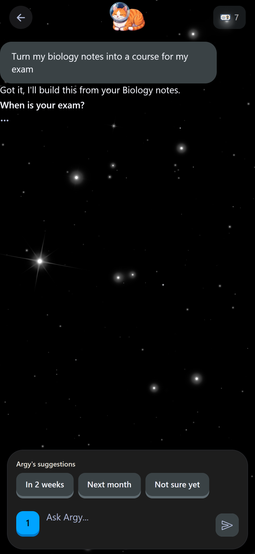
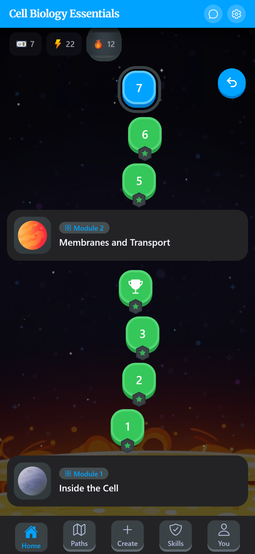
Once your files finish attaching inside Learn Anything AI - Argsmind, Argy confirms your format (a full course, a quiz deck, or flashcards), asks a couple of targeted intake questions, and generates a background build. You receive an alert as soon as your planet path is ready.
Pick PDF, PPTX, PNG, JPG, JPEG, WEBP, TXT, or Markdown files inside the mobile composer.
Choose My content only to stick strictly to your files, or Standard / Advanced research to add extra depth.
Set your current knowledge level, goal, and daily pace so Argy maps modules along your planet path.
File extraction and course generation run inside the Learn Anything AI - Argsmind mobile app on Android and iOS rather than through a web upload form here. Download the app free to upload up to 10 documents and generate your first interactive course or flashcard deck.