
An AI tutor app that builds courses around what you need
Learn Anything AI - Argsmind pairs interactive lessons with Argy, an AI tutor built for Android and iOS. Before creating a course, Argy asks a few quick questions to shape modules around your topic or uploaded files. Inside lessons, Pro subscribers can also switch on Tutor Mode to chat directly with Argy.
What does Argy do before building your course?
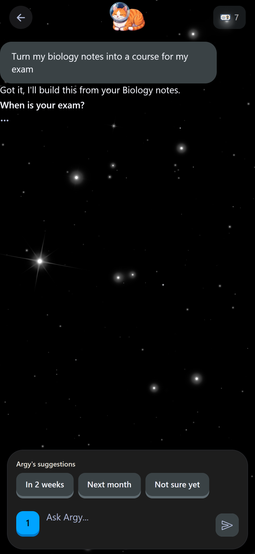
Before generating a single lesson, Argy opens a short intake chat and asks whether you want a full course, a quiz deck, or flashcards. Argy checks your current level, goal, and timeline, and lets you attach up to 10 PDF, PowerPoint, image, text, or Markdown files or pasted notes.
Argy adapts just as smoothly for working professionals and adult learners as for full-time students. Whether you are learning spreadsheet cash tracking for work, prepping for an interview in a new career, or studying from an onboarding manual in 5 to 20 minutes a day, Argy shapes exercises around your background.
Three build formats
Choose a multi-module planet course, a quiz deck, or a spaced-repetition flashcard deck.
My content only option
Ground a course strictly in your uploaded files when studying exact class handouts or work manuals.

What happens during an Argsmind lesson?
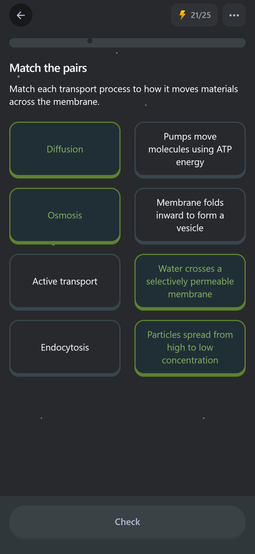
During each lesson, Argsmind replaces passive scrolling with short reading turns mixed with multiple choice, fill-in-the-blank, pair-matching, ordering, swipe-sorting, and flashcard steps. Lessons also include Tip and Key term callouts, zoomable diagrams and sketches, formulas, code panels, and language phrase audio.
Difficulty control between modules
Each module sits as a planet along your path, with a prompt to adjust difficulty as you advance.
Spaced-repetition review sessions
Review up to 10 due items at a time for your active course without spending lesson energy.
How does Tutor Mode work inside Argsmind?
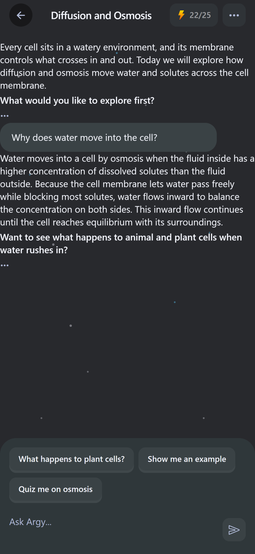
Tutor Mode is a Pro-only feature in Learn Anything AI - Argsmind. Instead of tapping through a fixed card player, Tutor Mode runs the exact same lesson inside a live chat thread with Argy, placing interactive exercises inline so you can pause anytime to ask why an answer works or request an example.
Tutor Mode is available only with an active Pro subscription. Free learners use the standard tap-through lesson player, flashcard decks, quizzes, and spaced-repetition reviews. Pro subscribers can also turn on optional read-aloud voice playback for Argy's replies.


What is free and what needs Argsmind Pro?
Learn Anything AI - Argsmind is free to download on Google Play and the App Store with no upfront card required. Free accounts receive starter and monthly course points, interactive courses, flashcards, and spaced-repetition reviews, while Pro unlocks Tutor Mode, unlimited lesson fuel, extra course points, and expanded Boards.
| Feature | Free plan | Argsmind Pro |
|---|---|---|
| Course & deck generation | Starter and monthly course points | Higher weekly or monthly course point allowance |
| Interactive lesson player | Included with energy that refills over time | Included with unlimited lesson fuel |
| Conversational Tutor Mode | Not included | Included (Pro only), with optional voice playback |
| Spaced-repetition review & streaks | Included; streak freeze every 2 lessons | Included; faster streak freeze (every 1 lesson) |
| Boards (shared study groups) | 1 board, 1 course, 1 friend per board | Up to 5 boards, 5 courses, 10 friends per board |
Subscription prices vary by country and app store and are displayed inside the app before purchase.